
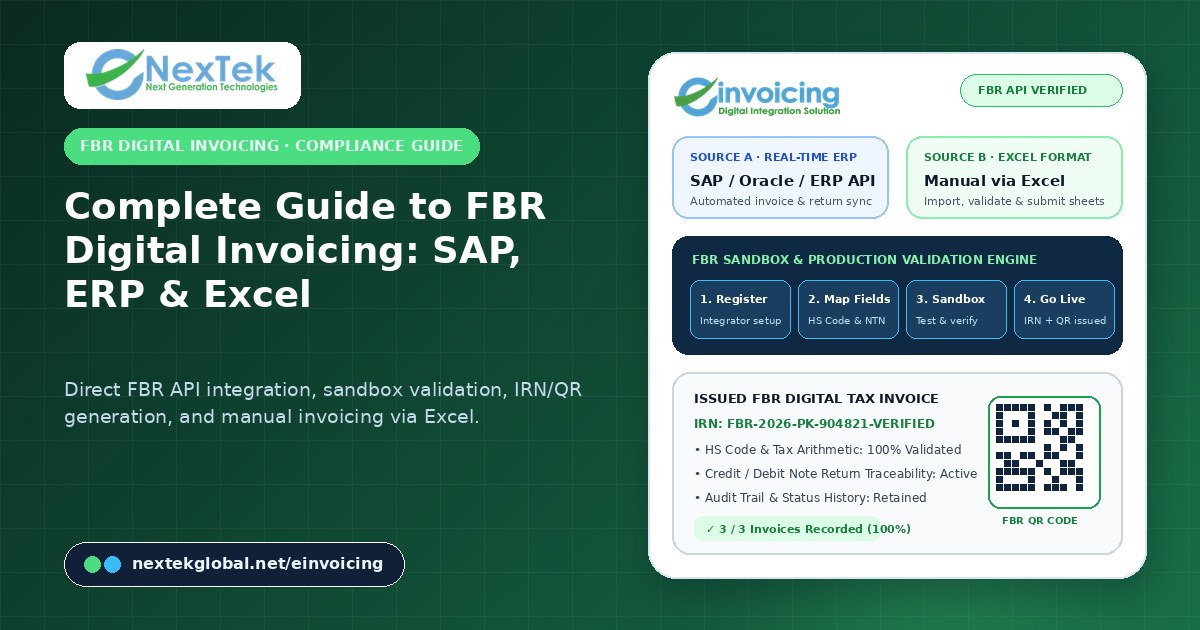
Regulatory tax compliance in Pakistan has entered a permanently connected digital era. Under the Federal Board of Revenue (FBR) digital invoicing framework, notified registered persons and corporate taxpayers are required to integrate their billing and accounting workflows with FBR’s real-time electronic invoicing infrastructure, transmit validated sales tax invoice and return payloads, and embed official Invoice Reference Numbers (IRNs) and verifiable QR codes on issued documents. Non-compliance carries both financial penalties—including statutory penalties under Section 33 (Entry 25A) of the Sales Tax Act—and operational disruption to B2B buyer input-tax adjustments.
Yet for CFOs, tax managers, and enterprise IT directors, moving from a mandate announcement to stable daily production invoicing requires more than an API specification document. It requires a structured implementation methodology that bridges tax rules, ERP data structures, exception handling, and user workflows. Nextek Global’s eInvoicing Digital Integration Solution provides a secure, audit-ready compliance layer that supports both real-time SAP / ERP integration and manual invoicing via Excel.
Why FBR Digital Invoicing Projects Stall Without a Structured Integration Layer
When organizations attempt to connect their internal billing systems directly to regulatory endpoints without a dedicated validation and monitoring layer, they frequently encounter four operational roadblocks:
- Master data and tax-field mismatches: Core ERP invoice records often store buyer NTN/CNIC numbers, HS codes, unit-of-measure (UoM) labels, sale types, or SRO schedules in free-text or legacy formats that fail strict FBR schema validation.
- Uncontrolled credit and debit note returns: Sales returns, rate adjustments, and cancelled invoices must reference original FBR invoice identifiers accurately; if handled outside the integration pipeline, ERP ledgers and FBR declarations drift out of sync.
- Network latency and retry gaps: If an ERP attempts a synchronous API call during peak billing hours without queue management, temporary network interruptions can stall warehouse dispatch or create duplicate invoice submissions.
- Lack of a practical path for non-ERP or multi-subsidiary billing: Many organizations operate a primary ERP in manufacturing while running specialized service divisions or smaller entities that prepare invoices in spreadsheets, requiring a unified compliance solution that supports manual invoicing via Excel alongside automated ERP feeds.
Stage 1: Registration Readiness and Integrator Selection
A successful FBR eInvoicing rollout begins before a single line of API mapping code is written. During the onboarding and readiness stage, Nextek Global works with your finance, tax, and IT teams to audit your current billing landscape:
- Reviewing taxpayer registration details, business activity classifications, and notified compliance timelines.
- Evaluating invoice volume, transaction types (standard rated, zero-rated, exempt, third-schedule, or further tax scenarios), and credit/debit return workflows.
- Selecting the right integration architecture—whether direct real-time ERP connectivity, scheduled batch synchronization, or manual invoicing via the standardized Excel template.
Stage 2: Direct FBR API Integration and Real-Time SAP / ERP Mapping
For enterprises running SAP (SAP ECC or SAP S/4HANA), Oracle, Microsoft Dynamics, or custom ERP platforms, Nextek Global implements a controlled integration layer that maps approved billing documents directly into the required FBR digital invoicing payload structure.
Rather than altering core ERP posting logic invasively, the eInvoicing connector extracts approved invoice header and line-item data, enriches and validates mandatory fields—such as buyer registration status, HS code formatting, quantity precision, tax rate calculations, and discount structures—and transmits the payload over a secure, monitored API channel. Once FBR validates the submission and returns the official Invoice Reference Number (IRN) and QR code payload, eInvoicing records the response against the transaction and makes the compliant tax invoice and audit log immediately available to finance and dispatch teams.
Stage 3: Manual Invoicing via Excel for Flexible Operations
Not every business unit operates a full-scale ERP, and even large enterprises often have specialized billing streams—such as scrap sales, inter-branch services, or newly acquired subsidiaries—that are managed outside the primary ERP. Nextek Global designed eInvoicing so that organizations do not need an expensive ERP overhaul just to achieve FBR compliance.
Through the Manual Invoicing via Excel workflow, finance teams prepare sales invoices and returns in a structured, pre-validated Excel format. Users simply import the completed Excel sheet into the eInvoicing workspace, where the platform automatically checks every row for required NTN/STRN formats, HS codes, quantity and rate arithmetic, and tax calculations. Any row with missing or malformed data is flagged clearly for correction before submission, ensuring that only valid, compliant invoices are transmitted to FBR.
| Implementation Dimension | Real-Time SAP / ERP API Integration | Manual Invoicing via Excel Workflow |
|---|---|---|
| Best Suited For | Medium-to-large enterprises running SAP, Oracle, Microsoft, or custom ERPs | Growing businesses, service units, or teams without a full ERP integration |
| Data Capture Method | Automated API / connector extraction upon ERP invoice approval | Structured preparation in the standard Excel format with one-click import |
| Pre-Submission Validation | Automated schema, HS code, tax rate, and arithmetic verification | Instant row-by-row validation flagging missing or invalid fields before upload |
| IRN & QR Generation | Returned automatically to ERP / invoice print layout in real time | Generated upon FBR submission with downloadable compliant invoice records |
| Audit & Return Handling | Full transaction history for sales invoices, credit notes, and debit returns | Centralized submission status, validation logs, and traceable return processing |
Stage 4: FBR Sandbox Testing and Pre-Production Validation
Going live directly in production without comprehensive scenario testing is the leading cause of post-launch billing disruptions. Nextek Global structures every deployment around a dedicated FBR Sandbox Testing & Validation phase:
- Representative scenario testing: Running real-world samples of registered and unregistered buyers, multi-line invoices, discounts, tax exemptions, and credit/debit notes through the FBR sandbox environment.
- Arithmetic and rounding verification: Confirming that line-item extensions, tax percentages, and invoice totals reconcile to the exact decimal precision expected by both your accounting ledger and FBR validation rules.
- Exception and retry drills: Verifying how finance users review rejected records, fix master-data exceptions (such as an outdated customer tax registration), and resubmit cleanly without duplicating transactions.
Stage 5: Production Go-Live, Transparent Pricing, and Audit Readiness
Once sandbox validation is complete, transitioning to production operations is straightforward and predictable. Nextek Global offers transparent eInvoicing subscription plans tailored to monthly invoice volumes—from Basic (up to 5 invoices/month) and Starter (50 invoices/month) to Most Popular Standard (100 invoices/month) and Unlimited (100+ invoices/month), paired with a clear one-time integration setup.
In daily operations, finance leaders gain a single operational dashboard showing total invoices prepared, validated, submitted, and recorded, complete with searchable transaction histories and retained audit evidence for tax reviews.
Frequently Asked Questions
Can we start with manual invoicing via Excel and later upgrade to SAP or ERP integration?
Yes. Many organizations begin with manual invoicing via Excel to meet immediate FBR compliance deadlines and subsequently transition to automated SAP or ERP API integration as their internal systems roadmap progresses.
Does Nextek eInvoicing support both sales invoices and credit/debit returns?
Yes. The eInvoicing workflow processes both sales invoices and sales returns through one structured validation and submission pipeline with full transaction traceability.
How can we schedule an FBR eInvoicing consultation with Nextek Global?
Visit the eInvoicing product page to review plan options or contact Nextek Global to speak with our Karachi head office or Georgia international team.
How does eInvoicing protect invoice data security and operational continuity?
Nextek eInvoicing enforces role-based access control, encrypted API transport, pre-submission schema validation, and complete audit logging across every user action. Finance managers can review who prepared, validated, or submitted each invoice batch, verify FBR response codes and IRN timestamps, and export reconciliation reports for monthly sales tax filing and statutory external audits without exposing core ERP credentials.



 AI-enabled procurement platform
 FBR digital invoicing integration
 Enterprise AI governance platform